


Wahls Diet App
2.610.00 Reviews
App Specs
- Version
- 1.12.9
- Updated On
- License
- Free
- Downloads
- 10,000+
- Developer
- Foogal
- Categories
- Medical
- Platform
- Android
Screenshots
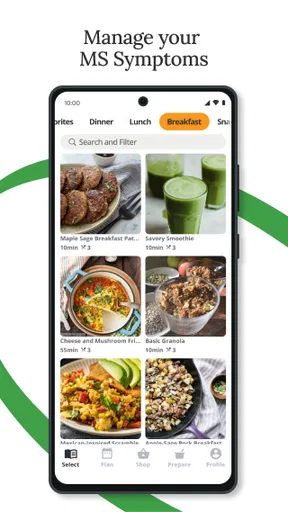
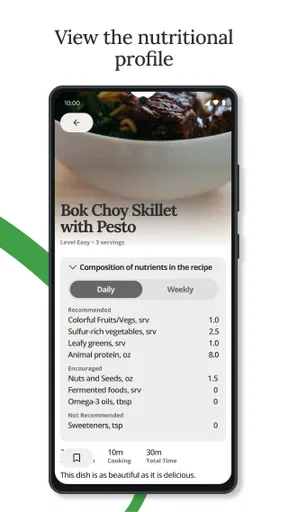
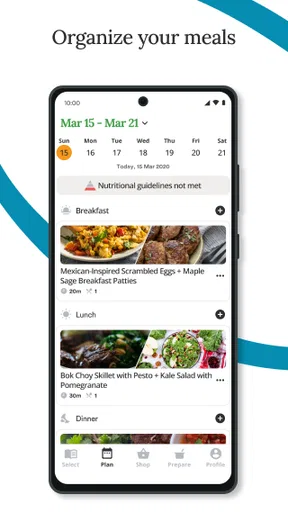
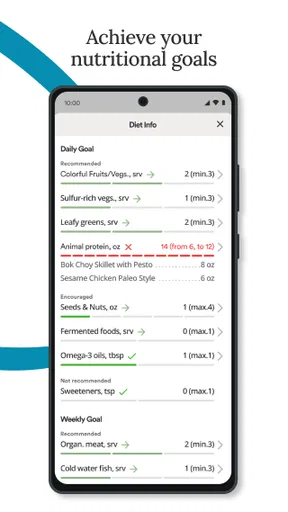
 Analysis by AppCompare
I approached Wahls Diet App as a practical companion for people with multiple sclerosis who want to organize food-related habits around the Wahls diet. It sits in the medical category, but I would not treat it as a replacement for a neurologist, dietitian, or individualized treatment plan. Its real value is in helping turn a broad dietary idea into something you can revisit during ordinary shopping, meal planning, and symptom-tracking routines.
The app is free to install, with optional in-app purchases priced from $14.99 to $99.99 per item. That combination makes the first step easy, but it also means I would spend time testing the basic experience before paying for anything. Foogal is the developer, and the app is suitable for Everyone from an age-rating perspective. It was released on July 19, 2022, and version 1.12.9 is the version I considered here.
How connectivity changes the everyday experience
I find that connectivity can shape whether Wahls Diet App feels like a handy reference or an extra task, so I’d test my usual routine before depending on it away from home. I’d also decide what information I need to carry forward in my own notes, especially when a meal plan has to be shared with someone else. That practical handoff matters as much as opening the app itself.
What happens when the app needs a connection
The most important practical point is that a diet app is often used at inconvenient moments: standing in a supermarket aisle, checking a meal idea while cooking, or trying to remember what you intended to buy. In those situations, the quality of the experience depends not only on the content but also on how reliably the phone can reach the service. I would therefore open the app at home, while connected to a dependable network, before relying on it during a shopping trip.
That preparation matters because a weak signal can turn a quick decision into an irritating pause. If a page, recipe, account area, or other online element takes time to load, the app becomes less useful precisely when I need a fast answer. I would avoid assuming that every part of the experience remains available without a connection. Instead, I would check the screens I expect to use and make a small written or saved shopping plan before leaving home.
This is especially relevant for someone managing fatigue, concentration problems, or fluctuating symptoms. A person may not have the energy to troubleshoot a loading problem in a crowded store. My practical approach would be to use the app for preparation rather than making it the only source of information at the point of purchase. That simple change reduces the pressure on the connection and makes the tool feel more dependable.
Using it in a real shopping routine
Imagine that I am planning meals for several days after a difficult week. At home, I would review the app, identify the foods and meal ideas that fit my current plan, and write a short list grouped by the sections of my supermarket. I would then use the phone as a reference rather than repeatedly opening new screens between shelves. This workflow also gives me a chance to notice whether a recommendation suits my budget, cooking time, and energy level.
Worth Reading Before You Choose

Flipboard Shows What News Apps Must Do Beyond the Feed

Switching to Android Auto Means Rethinking Your Driving Routine

Google Calendar Makes a Crowded Week Easier to Manage

Ludo King Makes the Most of the Minutes Between Plans

Baby Panda World Brings Quick Play to Modern Phones, but Its Game Library Feels Busy

ESPN’s Live Game View Makes Following Close Games Easier
The less obvious benefit is that preparation separates dietary decisions from shopping stress. If I wait until I am in the store to decide everything, a slow connection or an unfamiliar ingredient can push me toward convenience food. If I make the main decisions earlier, the app has already done its most useful work before connectivity becomes a concern.
I would also keep a backup note for ingredients that matter to my routine. This is not because the app is necessarily unreliable; it is because phones, networks, and batteries are all imperfect. A diet-management tool should support a routine, not become a single point of failure in that routine.
Mobile use beyond the kitchen
The mobile format makes the app more relevant than a static article for people who want to revisit guidance while moving through the day. I can imagine checking it at breakfast, comparing an idea with what is already in the cupboard, or reviewing a plan before preparing dinner. The phone is close at hand, and that lowers the effort needed to return to the diet after a disrupted day.
There is a trade-off, though. A compact screen is convenient for quick checks but less comfortable for studying a large amount of dietary information. I would not want to make a complicated meal plan while standing on public transport or dealing with symptoms. For deeper planning, a calm setting with a charger nearby is better. The app works best as part of a two-stage routine: thoughtful planning when I have time, followed by brief mobile reference later.
People with MS may also have days when hand control, vision, or attention is not at its best. That makes unnecessary tapping and repeated navigation more tiring than it would be for a casual food app. I would keep the routine simple, avoid trying to reorganize an entire week in one sitting, and stop if the process starts to feel like another task to manage.
Recovery when something goes wrong
A useful test for any health-related app is not only what happens when everything works, but how easily I can recover after an interruption. If the app stops responding, I would first return to the previous step, check the connection, and reopen the relevant screen. I would avoid repeatedly submitting the same action, especially if it involves an account or a purchase, until I know whether the first attempt succeeded.
For a meal-planning routine, recovery is easier when I keep a simple external record of decisions. A note containing the meals I intended to prepare, the ingredients already purchased, and any questions for my clinician prevents a temporary app problem from erasing the whole plan. This is one of the most useful habits I would recommend to a new user because it protects continuity without requiring complicated technical knowledge.
I would also introduce the app gradually. Rather than entering a large amount of information or changing my entire diet immediately, I would explore one part of the routine at a time. That makes it easier to identify whether a problem comes from the app, the network, an unclear instruction, or an unrealistic personal goal. It also reduces the chance of abandoning the diet because the setup felt overwhelming.
When symptoms are changing, recovery should include a medical check rather than only an app restart. The app can help organize questions and food-related observations, but it should not be used to explain a sudden neurological change or justify stopping prescribed treatment. That boundary is important: convenience does not turn dietary guidance into clinical supervision.
Being careful with mobile data and purchases
Because this is a medical app with optional purchases, I would be deliberate about when I use it and what I buy. On a limited mobile-data plan, I would prefer to explore it over Wi-Fi and avoid repeatedly loading the same material while away from home. I would also read the purchase details carefully before confirming anything, especially if I am only trying to understand whether the paid material fits my needs.
The free entry point is helpful for deciding whether the app’s approach suits me. The optional items, ranging from $14.99 to $99.99 each, create a meaningful difference between trying the app and committing to its fuller experience. I would not pay simply because the subject is important. I would first ask whether the added material gives me a clearer routine, saves enough time, or addresses a specific problem I actually have.
My data-conscious workflow would be simple: review content at home, make notes for the supermarket, and use the phone briefly when I need a reminder. That approach also improves battery life and reduces the frustration of waiting for pages in places with poor reception. It is a small adjustment, but it makes the app feel more like a planned health tool and less like something I have to constantly keep open.
What the app does well for a focused user
The strongest reason to try it is focus. Instead of searching the wider internet for scattered explanations about the Wahls diet, I can begin with an app built around that specific approach. For someone who already wants to investigate this dietary framework, that focus may be more useful than a general calorie counter or a broad recipe collection.
It can also provide structure for conversations with a healthcare professional. I would note which parts of the diet seem realistic, which foods are difficult to source, and which changes appear to affect my routine. Bringing those concrete questions to a clinician is more productive than saying only that I am “trying to eat better.” The app becomes a planning aid rather than an authority.
Another strength is its potential role during gradual change. A person does not need to redesign every meal overnight. I would use it to choose one manageable adjustment, test it for a while, and then decide whether the next step is practical. This is particularly important when fatigue, work schedules, family meals, or medication routines limit flexibility.
Where it is less convincing
The average rating is 2.6 from around two dozen ratings, with about ten written reviews, so I would approach the app with realistic expectations rather than assuming a polished experience for everyone. Those figures do not tell me exactly which problems each reviewer encountered, but they are enough to justify a careful trial before purchasing optional content.
The app is also not the right choice for someone seeking a general-purpose food tracker, a detailed nutrient database, or a complete medical-management platform. Its identity is tied to the Wahls diet and MS symptom management. If my main goal were counting calories, monitoring allergies, planning family meals across many dietary styles, or recording medication adherence, I would look for a tool designed specifically for that job.
I would skip it as a sole resource if I wanted personalized medical advice. A focused dietary app can organize ideas, but it cannot account for every diagnosis, medication, allergy, swallowing issue, kidney concern, or nutritional deficiency. Anyone with a complex medical situation should discuss major dietary changes with a qualified professional before treating the app’s guidance as a personal prescription.
How it compares with familiar alternatives
Compared with a general recipe app, this one has a narrower purpose. A recipe service may offer more variety, better discovery tools, or easier household planning, but it may not keep the Wahls approach at the center. Compared with a calorie tracker, Wahls Diet App is better suited to someone thinking about food quality and a particular dietary framework rather than numerical intake.
A spreadsheet or paper notebook is less convenient for discovering organized guidance, yet it offers excellent control, works without a network, and costs nothing beyond the effort of maintaining it. For a person who already knows the diet well, that low-tech option may be better. I would choose this app when I need a focused starting point, and a notebook when I need a dependable long-term record that I fully control.
A consultation with a dietitian remains the stronger alternative for personalization. The app can help me prepare for that appointment by collecting practical questions and examples from daily life. It cannot replace the professional’s ability to adapt nutrition advice to medical history, laboratory results, symptoms, and changing treatment.
Who will get the most from it
I think the best fit is an adult with MS who is curious about the Wahls diet, comfortable trying a structured digital aid, and willing to evaluate changes carefully rather than expecting instant symptom relief. It may also help a caregiver or family member who shares meal-planning responsibilities and wants a common reference point.
The app is less suitable for someone who dislikes subscription-style or optional digital purchases, needs guaranteed offline access, or wants a highly customizable nutrition dashboard. It is also a poor fit for anyone looking for certainty from an app. Dietary experiments require patience, attention to the whole health picture, and a willingness to stop or adjust when something is not working.
Since it is free to install and rated for Everyone, the sensible approach is to try the basic experience in a low-pressure setting. I would examine how easily I can find the material I care about, whether the navigation feels manageable on a tired day, and whether the content helps me make a real meal decision. Only after that would I consider an optional purchase.
My connectivity verdict
Connectivity shapes this app more than its short store identity suggests. It is most dependable when I use it as a preparation tool over a stable network, then carry a concise plan into the day. I would not build my entire shopping trip or symptom response around immediate access to the app, and I would keep personal notes for continuity when signal, battery, or attention becomes a problem.
Overall, I see Wahls Diet App as a focused starting point rather than a complete medical solution. Foogal has created something that may suit people specifically exploring the Wahls diet, but the modest public rating and paid optional items make a measured trial sensible. My recommendation is to use it alongside professional care and a simple backup routine: let it organize ideas, test changes gradually, and judge its value by whether it makes your real meals and conversations with clinicians clearer.
Pros
- Simple food guidance makes the diet easier to follow daily.
- Helpful meal ideas can support planning and reduce guesswork.
- Suitable for users seeking a structured anti-inflammatory eating approach.
- Clear dietary principles may help users identify foods to limit.
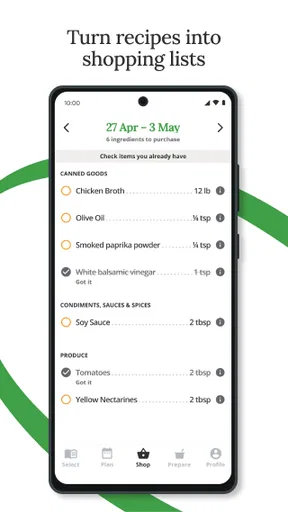
- Useful as a reference when preparing shopping lists and meals.
Cons
- Some recommendations may feel restrictive for people with varied diets.
- The app should not replace advice from a doctor or dietitian.
- Meal options may not suit allergies
- intolerances
- or personal preferences.
- Nutritional information may be limited compared with dedicated tracking apps.
- Following the plan can require extra time and careful ingredient checking.
FAQs for Wahls Diet App
What is the Wahls Diet App designed to help with?
The Wahls Diet App is intended to help users learn about and organize a diet inspired by the Wahls Protocol, which emphasizes nutrient-dense vegetables, fruits, quality proteins, healthy fats, and reduced consumption of highly processed foods. It may provide meal ideas, food guidance, tracking tools, or educational material, depending on the version available. It should be viewed as a support tool rather than a medical treatment or diagnosis app.
Is the Wahls Diet App suitable for everyone?
Not necessarily. The dietary approach promoted by the app may not be appropriate for children, pregnant or breastfeeding individuals, people with food allergies, or users managing diabetes, kidney disease, digestive disorders, or other medical conditions. Some recommendations may also be difficult to follow with specific dietary restrictions. Before making major changes to your eating habits, discuss the plan with a qualified doctor or registered dietitian.
Does the app provide personalized meal plans and nutrition advice?
The level of personalization can vary according to the app’s features, subscription plan, and the information you enter. Some users may receive meal suggestions, shopping guidance, or progress-tracking options, while others may find mainly general educational content. Even when the app appears personalized, its recommendations should not replace professional nutritional advice, particularly if you take medication or have a diagnosed health condition.
Can the Wahls Diet App treat multiple sclerosis or other chronic illnesses?
No. The app cannot diagnose, cure, or independently treat multiple sclerosis or any other chronic illness. A Wahls-inspired eating pattern may be used by some people as part of a broader wellness routine, but individual results can differ and scientific evidence may not support every claim associated with the diet. Users should continue prescribed treatment and consult their healthcare team before using the app to guide disease management.
Is the Wahls Diet App free to download, and does it include in-app purchases?
The app may be available to download at no initial cost, but certain features, meal plans, courses, recipes, or tracking tools can require a subscription or one-time purchase. Pricing, trial periods, renewal terms, and available features may differ between Android and iOS. Check the store listing and subscription screen carefully before starting a trial, and review cancellation instructions to avoid unexpected recurring charges.


